
PortalCam — The First True Spatial Camera
PortalCam captures light fields, not flat pixels — fusing ToF LiDAR depth, an RGB camera array and dedicated edge AI to turn any indoor space into a photorealistic, walkable 3D environment in minutes. No heavy PC, no external tracking, no complex setup.

PortalCam
Handheld Spatial Camera · XGRIDS
870g · 60min BatteryLight-Field Capture for Instant 3D Spaces
PortalCam combines a Time-of-Flight LiDAR sensor for depth, an RGB camera array for colour, and dedicated edge AI for real-time 3D Gaussian Splatting reconstruction. Four cameras — two front-facing plus a fisheye lens on each side — fuse texture and geometry as you walk, live, without post-processing on a separate PC.
Captured data automatically syncs to LCC Studio, generating textured, real-time 3D models compatible with Unity, Unreal Engine and Blender — ready for virtual tours, digital twins and immersive marketing.
Depth and colour captured and fused in real time
Edge AI processes 3D Gaussian Splats on-device
LCC Studio finalises walkable 3D models
Compatible with Unity, Unreal Engine, Blender
Key Benefits
Capture an entire indoor space in a single walkthrough.
Native 3D Gaussian Splatting delivers lifelike detail no photogrammetry rig can match this fast.
No external tracking rigs, markers or dedicated workstation needed.
Sentra offers hands-on demos and onboarding as official reseller.
How PortalCam Works
PortalCam combines active depth sensing with passive visual capture and real-time AI — producing photoreal 3D environments from a single handheld walkthrough.

Perfect Spatial Structure
A ToF LiDAR sensor projects infrared light and measures return time to build a precise 3D depth map of every surface — capturing accurate geometry even in textureless or low-light environments where cameras alone fail.

Complete Visual Coverage
Four cameras — two front-facing RGB lenses plus a fisheye on each side — deliver a seamless 200° × 200° panoramic field of view, fusing colour and texture onto the depth mesh for photoreal detail from every angle.

Advanced Spatial Computing
Dedicated onboard GPU and AI engine run real-time 3D Gaussian Splatting reconstruction — no laptop, no external workstation. The captured environment is processed and refined on-device as you walk.
What Is a Spatial Camera?
Three Steps to Spatial Content
From capture to shareable 3D — the entire workflow is designed for speed and simplicity.
Capture
Walk through the space at a natural pace. PortalCam records depth, colour and motion data simultaneously. Monitor the live 3D preview on your phone via the LCC Scan app.
Process
Onboard AI generates a real-time 3D Gaussian Splat during capture. LCC Studio automatically generates publication-ready 3DGS models from the scan data using SLAM algorithms, sensor fusion and model optimisation — with minimal manual intervention.
Apply
Edit, annotate and share walkable 3D spaces. Export to Unity, Unreal Engine, Blender, or publish directly as interactive web-based walkthroughs.
True 3D Content in Action
Real Estate
- Create immersive, walkthrough-ready 3D tours of properties in minutes — no photography crew or staging required
- Capture accurate spatial layouts with true-to-scale geometry for remote buyer walkthroughs
- Generate shareable links for listings — buyers explore every room interactively from their browser
- Reduce time-to-listing from days to hours with a single handheld capture session
Film Production
- Digitally preserve real-world locations as photoreal 3D environments for pre-visualisation and virtual production
- Capture authentic location scans for VFX set extensions — matching real-world lighting and geometry
- Export directly to Unreal Engine for real-time rendering in virtual production pipelines
- Reduce location re-visits by capturing complete spatial references in a single walkthrough
Content Creation
- Build photoreal 3D assets for social media, YouTube and immersive web experiences from real spaces
- Create interactive museum exhibits, product showcases and educational content from actual environments
- Share walkable 3D scenes directly via web links — no app download required for viewers
- Combine with 3D text, annotations and overlays in LCC Studio for branded spatial content
Personal Memory
- Preserve your home, garden or meaningful spaces as photoreal 3D memories you can revisit anytime
- Capture a child's room, holiday rental or family space — walk through it again years later in full 3D
- Share spatial memories with family and friends via a simple web link — they explore in their browser
- Lightweight, one-hand operation makes capturing personal spaces effortless and unobtrusive
What Makes PortalCam Different
Native 3D Gaussian Splatting
Real-time light-field reconstruction captures texture and geometry together for photoreal 3D output.
Four-Camera Array
Two front cameras plus dual fisheye lenses deliver a 200° × 200° panoramic field of view.
Edge AI Processing
Dedicated onboard AI processes reconstruction without needing a connected laptop or PC.
LCC Studio Processing
Automated 3DGS processing produces polished, shareable, walkable 3D models.
512GB Internal Storage
Ample onboard storage with USB 3.0 offload for large capture sessions.
3D Engine Compatible
Export directly into Unity, Unreal Engine and Blender pipelines for interactive experiences.
LCC Studio — Desktop Processing
Monitor scans live via the LCC Scan mobile app, then let LCC Studio handle automated 3DGS processing, editing and export — all on your local machine.
3DGS Processing
Refine raw PortalCam captures into publication-quality 3D Gaussian Splat models with adjustable detail and quality settings.
LCC Format Output
Export in LCC, PLY and USDZ formats — optimised for web sharing, AR deployment, and integration with Unity, Unreal Engine and Blender.
Download Sample Data
Try before you buy — download pre-captured PortalCam sample scenes to explore the output quality and compare with your existing workflows.
The Difference Is Depth
PortalCam doesn't just take pictures — it captures spatial structure. Here's how it compares to other capture methods.

| PortalCam | 360° Camera + Tripod | Phone 3D Scanning | DSLR Photos | |
|---|---|---|---|---|
| Capture Method | LiDAR + RGB + AI — single walk | 360° panoramic stitching | ARCore / LiDAR on phone | Multi-angle photo set |
| 3D Geometry | True depth-accurate mesh | No geometry — images only | Approximate mesh | Requires photogrammetry post |
| Walkable Output | Native walkable 3DGS | Static panoramic hotspots | Limited AR viewing | Requires 3rd-party processing |
| Capture Time | Minutes | Minutes (per room) | Minutes | 30 min+ per scene |
| Post-Processing | None on-device; optional cloud | Stitching + hotspot editing | Cloud processing | Hours of photogrammetry |
| Equipment Needed | PortalCam only — handheld | Camera + tripod + laptop | Phone only | DSLR + tripod + workstation |
| Output Quality | Photoreal, spatially accurate | Flat image quality | Low-detail mesh | High photo, variable 3D |
A Complete Toolkit for Any Space
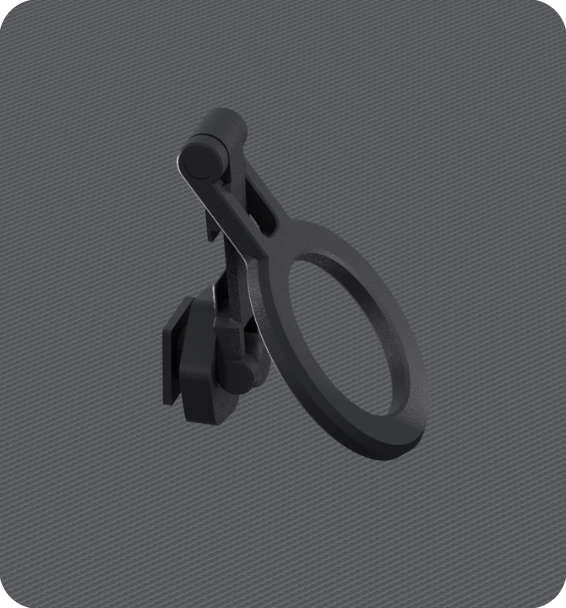
Phone Mount
Securely attach your smartphone for live LCC Scan app monitoring during capture sessions.
External SSD
Optional 512GB or 1TB external SSD for extended capture sessions and fast data offload.
Optional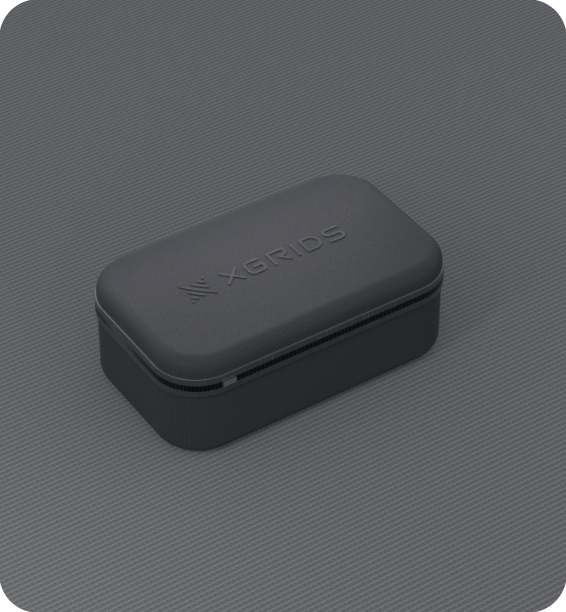
Protective Backpack
Padded carry case for PortalCam and accessories — designed for field work and travel.

Extension Pole
Reach higher vantage points for elevated captures — ideal for large interiors and atriums.
OptionalPortalCam Specifications
| LiDAR Scanning Range | 0.1–30m @ 10% reflectivity; 60m @ 90% reflectivity |
|---|---|
| LiDAR Point Rate | 856,000 points/sec |
| LiDAR Field of View | 180° azimuth × 180° elevation |
| Laser Classification | Class 1 / 940 nm |
| Camera Configuration | 4-camera array — 2× fisheye + 2× front-facing |
| Camera Resolution | 4000 × 3000 px (1/2" CMOS, rolling shutter) |
| Fisheye Camera FOV | 200° × 200° (each) |
| Front Camera FOV | 100° × 85° (each) |
| Processing | Onboard GPU + IMU + AI — real-time 3D Gaussian Splatting |
| Storage | 512GB internal + optional external SSD (512GB/1TB) |
| Data Interface | USB 3.0 |
| WiFi | 802.11 a/b/g/n/ac/ax — 2.4GHz & 5GHz |
| Bluetooth | 5.2 |
| Wireless Range | 20m (65.6 ft) |
| GPS Module | Supported |
| Battery Type | Removable Li-ion, 23.04Wh |
| Battery Life | 60 minutes continuous scanning |
| Charging | 0–90% in 70 min; 0–100% in 90 min (USB-C PD 45W) |
| Weight | 870 g (1.9 lb) without tripod |
| Dimensions | 130mm × 90mm × 77mm |
| Housing | Aerospace-grade aluminium alloy |
| Power Consumption | < 19W |
| Operating Temperature | -20°C to 45°C (indirect sunlight only) |
| Charging Temperature | 5°C to 30°C |
| Output Formats | PLY, USDZ, LCC — Unity, Unreal Engine, Blender compatible |
Need the full technical datasheet?
Download the complete PortalCam brochure
Got Questions About PortalCam?
Can't find what you're looking for? Contact our team — we're happy to help.
No — PortalCam's dedicated edge AI processes 3D Gaussian Splatting reconstruction on-device. Data then syncs automatically to LCC Studio, which uses SLAM algorithms, sensor fusion and model optimisation to generate the final publication-ready model.
PortalCam is optimised for indoor spatial capture and photoreal 3D Gaussian Splats for walkthroughs and marketing. The Lixel K2 is a survey-grade SLAM LiDAR scanner built for outdoor range, RTK positioning and engineering-accurate point clouds.
Most rooms or small properties can be captured in a single continuous walkthrough of a few minutes. PortalCam's battery supports up to 60 minutes of continuous scanning per charge, with hot-swappable batteries available for larger sessions.
Yes — finished 3D Gaussian Splat models are compatible with Unity, Unreal Engine and Blender for interactive or cinematic use.